

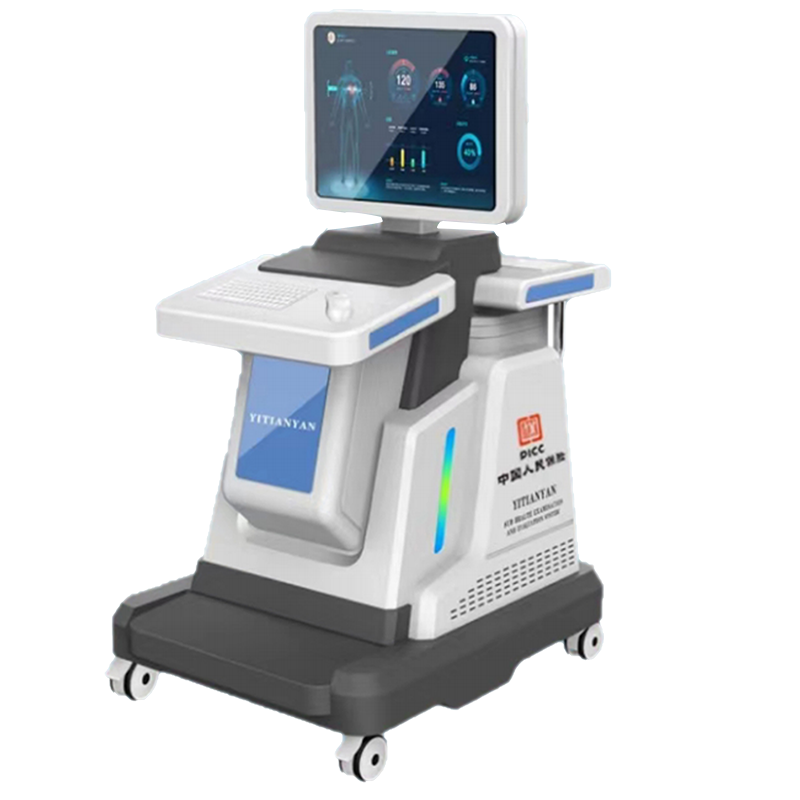
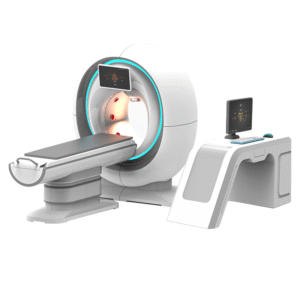
Analyzer for body wellness reporting gives teams a structured way to organize guided review sessions, explain report sections and compare supplier documentation before purchase. The page describes a professional assessment workflow without presenting the equipment as a medical diagnostic tool.
This configuration is intended for wellness centers, product showrooms, training rooms and consultation settings. It can support a repeatable conversation when staff need to introduce a report, document a session and explain which items still require professional interpretation.
Why choose an analyzer for body wellness reviews?
A clear workflow matters as much as the hardware. First, staff prepare the station and confirm the software version. Next, they enter only the information needed for the session. Then, they follow the supplier’s approved operating steps. Finally, they review the generated report with the client and record any follow-up questions.
This sequence helps a business deliver a more consistent experience. Moreover, it makes training easier because each operator can follow the same checklist. The equipment should support informed wellness conversations. However, it should not replace licensed clinical testing, diagnosis or treatment.
Designed for structured report discussions
The system can be evaluated around the quality of its reports rather than broad health promises. Buyers should request a live demonstration with representative sample reports. They should also ask the supplier to explain every data source, reference range, status label and comparison view shown by the software.
- Review the report layout before approving a purchase.
- Check whether labels and units are clear to staff and clients.
- Confirm how the software stores, exports and deletes session records.
- Ask whether templates can match the language used by your team.
- Verify which hardware components are included in the quotation.
- Document the exact software version used during the demonstration.
Practical uses in a wellness business
An analyzer for body review sessions may fit several non-clinical workflows. For example, a wellness center can use it during an educational consultation. A distributor can use it for product demonstrations. A training team can use sample reports to teach staff how to present information carefully. In addition, a buyer can compare workflow, interface and support between shortlisted systems.
The value comes from consistency and clear communication. Therefore, the operator should avoid interpreting a software label as proof of a disease. When a report raises a health concern, the appropriate next step is referral to a qualified healthcare professional.
What to verify before ordering
Technical names alone are not enough for procurement. Ask for the current specification sheet, user manual, packing list and warranty terms. Then compare those documents with the demonstration unit and the final quotation. This process helps prevent a mismatch between marketing language and the delivered configuration.
| Item | Verification question |
|---|---|
| Product identity | Is the quoted model clearly shown on the unit, carton and documents? |
| Hardware | Which sensors, cables, accessories and computer components are included? |
| Software | Which operating system, language options and report modules are supported? |
| Report output | Can staff preview, export and explain a complete sample report? |
| Data handling | Where are records stored, and how can authorized staff delete them? |
| Training | Does the supplier provide operator guidance and updated materials? |
| Service | What remote support, replacement parts and warranty response are available? |
Operator workflow
1. Prepare the consultation area
Place the station in a calm area with appropriate privacy. Check the computer, cables and accessories before the client arrives. Also confirm that the correct software profile is active.
2. Explain the session scope
Tell the client what the session can and cannot provide. Use plain language and obtain any consent required by local policy. Do not promise diagnosis, disease prediction or treatment outcomes.
3. Follow the approved instructions
Use the current manual for positioning, connection and operating steps. If the manual and demonstration differ, pause and ask the supplier for written clarification.
4. Review the report carefully
Explain the report structure before discussing individual sections. Separate observed software output from professional medical interpretation. Consequently, clients can understand the information without receiving unsupported conclusions.
5. Close and protect the record
Answer workflow questions, record unresolved issues and explain appropriate next steps. Then follow the site’s privacy procedure for saving, exporting or deleting the record.
Report quality checklist
A useful report should be readable, consistent and traceable. During a demo, run more than one controlled sample if the supplier permits it. Compare the layout, labels and output behavior. In addition, ask how software updates may change the report.
- Are headings, units and reference labels easy to understand?
- Does the report show the time, operator and software version?
- Can the same sample workflow be repeated consistently?
- Are limitations and intended-use notes visible?
- Can staff export a clean file without exposing unrelated records?
- Is there an audit trail or practical record-management process?
Product details
| Model | TC-008 |
|---|---|
| Product category | Wellness assessment and report-review equipment |
| Primary setting | Wellness centers, showrooms, training rooms and guided consultations |
| Workflow | Operator-led session with software-generated report review |
| Final technical parameters | Confirm with the current official specification sheet and quotation |
| Intended positioning | Wellness education and structured consultation support; not a medical diagnosis or treatment claim |
The product model appears here for configuration control. Exact sensing method, voltage, sensor count, sampling time, measured regions and report modules are not stated as fixed specifications until the matching official documentation is verified.
Compare suppliers with the same test plan
Prepare one evaluation checklist before contacting suppliers. Use the same questions for each demonstration. This makes differences in training, report design, privacy controls and after-sales support easier to see. It also reduces the risk of choosing a system based only on an impressive visual presentation.
Ask each supplier to identify every optional component. Furthermore, request written confirmation of what the quoted price includes. If a report module requires a subscription, clarify the renewal cost, update policy and offline behavior.
Installation, training and support
Before delivery, confirm electrical, computer, network and space requirements. After installation, train operators on setup, report presentation, privacy and escalation procedures. A short competency checklist can help managers verify that staff follow the same process.
Support planning should cover software access, account recovery, replacement accessories and response times. Keep the manual, quotation and training record together. As a result, future operators can trace the approved configuration.
Frequently asked questions
Is this analyzer for body sessions a medical diagnostic device?
This page does not present it as a medical diagnostic device. Buyers must verify intended use, registration status and permitted claims for their market before deployment.
Does the system guarantee a fixed session time?
No fixed time is claimed here. Session length depends on the confirmed configuration, operator workflow, software and consultation process.
Are sensor count and voltage confirmed?
Not on the currently matched knowledge record. Request the specification sheet for the exact model and verify it against the delivered unit.
Can the report diagnose disease?
No disease diagnosis or prediction is promised. Qualified healthcare professionals should address medical questions and clinical decisions.
What should a buyer request before ordering?
Request a live demonstration, complete sample report, current manual, specification sheet, packing list, warranty terms, privacy information and written quotation.
Request verified specifications
Send your market, intended setting, preferred language and reporting workflow. We can then prepare a configuration discussion and a verification checklist. Before purchase, confirm all technical parameters, included accessories, software functions and compliance documents in writing.
Reviews
There are no reviews yet.