

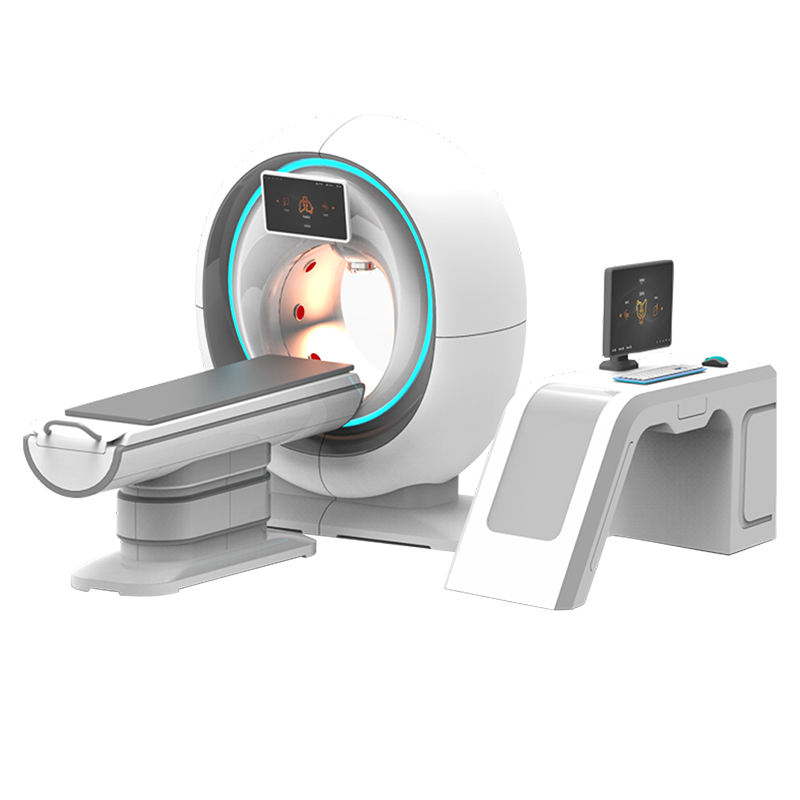
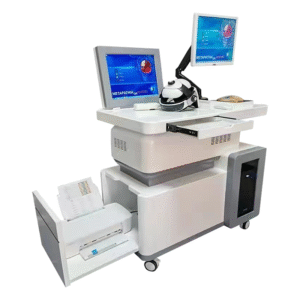
Equipment for health assessment should help wellness teams run clear consultations, compare report options and document a consistent client journey. This page presents a configuration-focused product for guided wellness reviews. It does not claim medical diagnosis, disease prediction or treatment.
The system may suit distributors, wellness centers, training facilities and demonstration rooms. Buyers can use this page to plan a supplier demonstration, confirm optional modules and review the software workflow before they order.
How equipment for health assessment supports a guided session
A professional session needs a defined beginning, middle and end. First, the operator confirms the approved configuration and prepares the workstation. Next, the client receives a plain-language explanation of the session scope. The operator then follows the current manual. Finally, both parties review the report structure and note questions that require qualified professional advice.
This approach keeps the conversation organized. It also helps a manager train several operators to the same standard. However, software output should never be presented as a confirmed clinical finding.
Choose the configuration before comparing prices
The legacy product page referenced optional Eagle Eye and 18D modules. Their current availability, functions and technical basis require written supplier verification. Therefore, each quotation should identify the base system, every optional module and all included accessories as separate line items.
A low headline price can be misleading when software, sensors, reports, training or support are optional. Ask for a complete bill of materials. In addition, request screenshots or a live demo of every report module included in the proposal.
- Confirm the exact product model and software edition.
- List each included and optional hardware component.
- Request a complete sample report from the quoted configuration.
- Check language, export and printing options.
- Confirm account, subscription and update requirements.
- Document warranty coverage and technical support response.
Evaluate the report, not the marketing claim
The report is the main interface between the equipment, the operator and the client. For that reason, buyers should examine its headings, units, reference labels and limitations. A good demonstration explains where each section comes from and how staff should describe it.
Ask the supplier to distinguish measured inputs, calculated values, database comparisons and explanatory text. Moreover, confirm whether the system records the software version and session time. These details improve traceability and reduce confusion during later reviews.
Suggested demonstration plan
Step 1: verify product identity
Match the model label on the demonstration unit with the manual and quotation. Record the software version and any connected accessories. If a module is optional, ask the supplier to show whether it is active.
Step 2: observe the complete workflow
Watch the operator prepare the station, create a session, follow the approved instructions and generate a report. Note every manual step and any automatic software action.
Step 3: inspect a sample report
Review the complete report instead of selected screenshots. Check labels, export quality, client identifiers and limitation notes. Also ask how incorrect records can be corrected or deleted.
Step 4: repeat a controlled demonstration
Where appropriate, repeat the same approved workflow. The goal is not to prove a health conclusion. Instead, the goal is to understand software behavior and operator dependence.
Step 5: confirm support
Ask who installs the system, trains staff and resolves software problems. Get response times, remote-access procedures and replacement-part terms in writing.
Procurement checklist
| Area | Evidence to request |
|---|---|
| Identity | Model label, packing list, manual and matching quotation |
| Configuration | Base functions plus a separate list of optional modules |
| Hardware | Named sensors, cables, computer requirements and accessories |
| Software | Version, supported operating system, language and account rules |
| Reports | Full sample output, export formats and explanation of data sources |
| Privacy | Storage location, user permissions, retention and deletion process |
| Training | Operator guide, competency checklist and update materials |
| Service | Warranty, remote support, response time and replacement availability |
Product details
| Model | JCY-08 |
|---|---|
| Product category | Wellness assessment and report-review equipment |
| Typical environment | Wellness centers, showrooms, training facilities and consultations |
| Legacy optional references | Eagle Eye / 18D; confirm current availability and scope in writing |
| Technical parameters | Use the current model-specific specification sheet and manual |
| Page positioning | Educational wellness review support, not a medical diagnosis or treatment claim |
The model appears only in this detail section for configuration control. The currently matched knowledge record does not verify a fixed voltage, electrode count, sampling frequency, body-region count, session duration or sensing principle. Consequently, those figures are not published as product facts here.
Data privacy and client communication
Before deployment, map how the software collects, stores, exports and deletes personal information. Give each operator an individual account if the system supports it. Limit access according to job responsibilities. Furthermore, keep exported reports in an approved location rather than on an open desktop.
Clients should understand why information is collected and how it will be used. Obtain consent when required by local rules. If a report creates a medical question, direct the client to an appropriate licensed professional.
Operator training priorities
Training should cover more than button clicks. Staff need to understand session scope, approved terminology, privacy duties and escalation steps. They should also know how to confirm that the correct module and software version are active.
- Use one approved introduction for every session.
- Follow the current manual without adding unverified preparation rules.
- Explain report sections without diagnosing a condition.
- Record technical problems and unresolved client questions.
- Protect account credentials and exported files.
- Refresh training after a software or report-template update.
Questions for the supplier
Ask direct questions and request written answers. Which functions belong to the base system? Which options need additional hardware or licenses? How often does the software change? Can the system operate without a continuous internet connection? What happens to stored records when an account expires?
Next, ask for the intended-use statement and available compliance documents for the destination market. Do not assume that a general certificate supports every marketing claim. Instead, check the exact product name, model and manufacturer shown on each document.
Frequently asked questions
Is this equipment for health assessment a diagnostic system?
This page does not describe it as a diagnostic system. Intended use and regulatory status must be verified for the destination market before deployment.
Are Eagle Eye and 18D included?
The legacy page described them as optional. Ask for a current quotation that separates included functions, optional modules, licenses and hardware.
Does the system complete every session in three to five minutes?
No fixed session time is claimed. Timing depends on the verified configuration, operator procedure, software and consultation workflow.
Are the sensor specifications confirmed?
Not in the current matched knowledge record. Verify sensor type, count, placement, electrical specifications and operating instructions with official model-specific documents.
Can the report predict disease?
No. This page makes no disease prediction claim. Medical concerns need assessment by qualified healthcare professionals.
What should be included in a final order?
The order should identify the model, hardware, modules, software edition, accessories, training, delivery, warranty and support terms.
Request a configuration review
Share your country, business setting, preferred report language, expected session volume and support needs. We can then organize the questions for a supplier demonstration. Before payment, verify every feature and technical parameter against the current manual, specification sheet and written quotation.
Reviews
There are no reviews yet.