

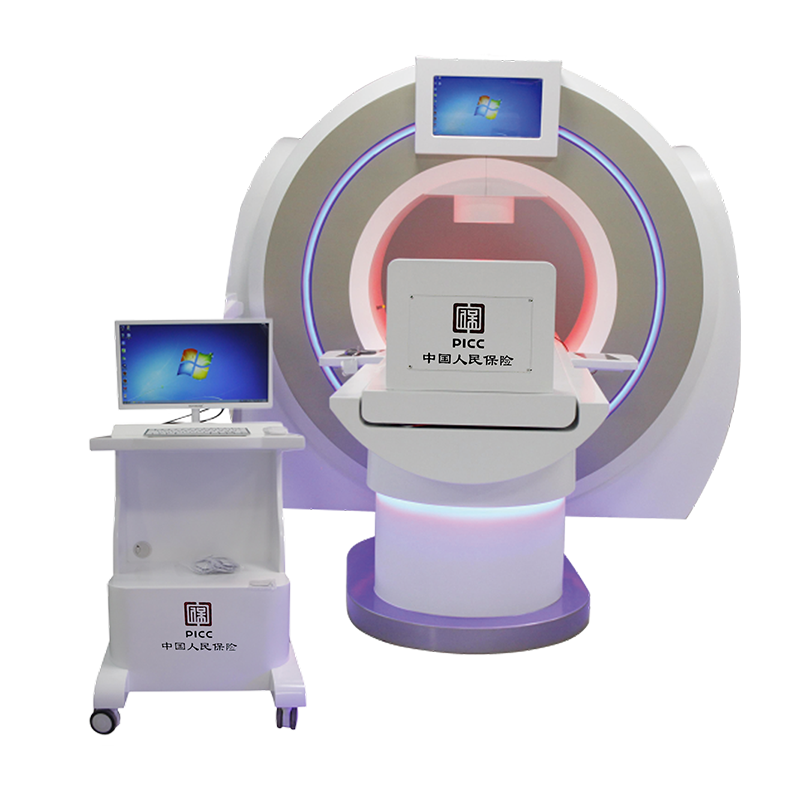
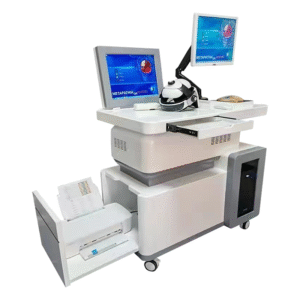
Wellness scanner selection should begin with the consultation experience, not an unsupported list of technical claims. This page helps buyers review a configurable reporting system for demonstrations, guided wellness conversations and staff training.
No confirmed model is mapped to this generic listing. Therefore, the final sensing method, accessories, modules and software must be matched to a current quotation before purchase. The page does not promise diagnosis, disease detection or treatment.
Where a wellness scanner may fit
A wellness center can use a structured report during an educational consultation. A distributor can demonstrate software workflow to prospective buyers. A training team can use sample output to practice approved language. In each case, a clear process matters more than a dramatic claim.
- Wellness consultation rooms
- Distributor and manufacturer showrooms
- Staff training and certification sessions
- Buyer demonstrations and configuration reviews
- Non-clinical educational report discussions
Start with a live demonstration
Ask the supplier to show the exact quoted configuration from startup to report export. First, check the product label and software version. Next, observe the operator workflow. Then, review a complete report. Finally, confirm how records are stored and deleted.
A complete demonstration exposes missing accessories, optional licenses and manual steps. Moreover, it gives your team a realistic view of session time and training needs.
Questions for every report section
Reports can combine entered information, calculated results, database comparisons and explanatory templates. Ask the supplier to identify each source. Staff should understand the difference before presenting a report to clients.
| Review point | Question |
|---|---|
| Heading | Does the label describe wellness information without implying diagnosis? |
| Data source | Is the item entered, measured, calculated or compared with a database? |
| Units | Are units and reference labels defined in the manual? |
| Explanation | Can staff describe the section in clear, approved language? |
| Limitations | Does the report state its intended scope and limits? |
| Export | Can the file be saved securely in the required language? |
Configuration checklist
Generic listing names can hide major differences. Request a line-by-line quotation that identifies hardware, software, accessories, modules, training and support. If the seller mentions Eagle Eye or 18D, ask whether the name refers to software, hardware, a license or a report package.
- Exact model and manufacturer
- Current specification sheet and user manual
- Included sensors, cables and accessories
- Computer and operating-system requirements
- Included and optional report modules
- Account, subscription and update rules
- Warranty, training and support scope
Product details
| Current product mapping | Generic listing; exact model pending confirmation |
|---|---|
| Category | Wellness reporting and consultation equipment |
| Typical setting | Wellness centers, showrooms, training and guided reviews |
| Legacy option references | Eagle Eye / 18D; confirm availability and function in writing |
| Technical parameters | Use only the matched model-specific specification sheet |
| Claim boundary | No medical diagnosis, disease prediction or treatment promise |
Showroom demonstration workflow
Prepare a representative scenario
Use a typical business scenario instead of a perfect sales example. Prepare the same questions for every shortlisted supplier so comparisons remain fair.
Watch the operator
Record how many manual steps are required. Note where the operator makes choices that could change the report. Also identify steps that need extra training.
Inspect the complete output
Do not rely on selected screenshots. Review the full report, export file and printed result. Check readability, labels, branding options and limitation notices.
Test routine administration
Ask how to add users, reset passwords, update software, back up records and remove a client file. These tasks affect daily operations.
Confirm support readiness
Submit a sample technical question. Ask who responds, in which language and within what time. Confirm whether remote support requires access to client data.
Client communication
Before a session, explain what the service provides and what it does not provide. Obtain consent where required. During report review, use descriptive language and avoid turning a software label into a diagnosis.
If a client has symptoms or a medical concern, recommend an appropriate licensed professional. This boundary protects the client and supports responsible business practice.
Privacy and record handling
Identify every place where personal information can be stored. This may include the workstation, exported files, printed reports, cloud services and backups. Limit access to trained staff.
Set a retention period and deletion process. In addition, confirm what happens to cloud records if a subscription ends or the supplier relationship changes.
Localization and staff training
Check whether the interface and report support the required language. A translated sales brochure does not prove that the software is localized. Request a live view and complete sample.
Training should cover setup, approved wording, privacy, report export and escalation. Afterward, each operator should demonstrate the full workflow under supervision.
Total cost comparison
Calculate device price, computer needs, licenses, optional modules, shipping, installation, training, updates, accessories and support. Also ask about renewal fees and replacement lead times.
Use one comparison sheet for all suppliers. Consequently, a low headline price will not hide missing functions or recurring costs.
Frequently asked questions
Is this wellness scanner mapped to a confirmed model?
No. The current generic listing does not have a completed model-to-parameter mapping. Confirm the exact model before using technical specifications.
Are Eagle Eye and 18D included?
The old page called them optional. Request a written quotation and demonstration for current availability.
Does it complete a full assessment in three to five minutes?
No fixed duration is claimed. Total time depends on the verified equipment, software, operator and consultation.
Can the report diagnose disease?
No diagnostic or disease-prediction claim is made. Medical decisions belong to qualified healthcare professionals.
What should be verified before payment?
Verify model, hardware, modules, software, reports, training, warranty, support, privacy controls and compliance documents.
Request a verified quotation
Share your country, intended setting, report language, operator count and expected session volume. We can organize a comparison checklist. Final specifications should always match the exact model and written supplier documents.
Reviews
There are no reviews yet.